A twelve-person marketing agency I worked with moved off spreadsheets and into HubSpot CRM’s free tier in 2023. It was the right call. The team could see every deal, the forms fed contacts automatically, and nobody missed a follow-up for six months.
Eighteen months later they were paying close to $1,900 a month. They used maybe a third of what they bought. The free CRM had worked so well that the upgrade happened one feature at a time, and nobody added up the total until the CFO asked why the software line had tripled.
That is the HubSpot story in miniature. The free product is real, the platform is genuinely good, and the pricing ladder is designed to be climbed. Understanding the ladder before you start is the difference between a useful tool and a subscription you resent.
What the free tier actually gives you
HubSpot’s free CRM is not a demo. It includes contacts, companies, deals, tasks, notes, email tracking, forms, landing pages, live chat, and basic reporting. For a small team with one pipeline, it can run the sales process for a long time at zero dollars.
The limits are where the upsell lives. Automation is thin. Reporting is basic. Sequences, custom properties at scale, teams and permissions, and serious dashboards sit on paid tiers. The free product is also a lead-generation engine for HubSpot’s sales team, which is fine as long as you know it.
My rule: free is enough until you can name the specific manual task it forces you to repeat every week. Not “we might need more automation someday.” A named task, with a number of hours attached.
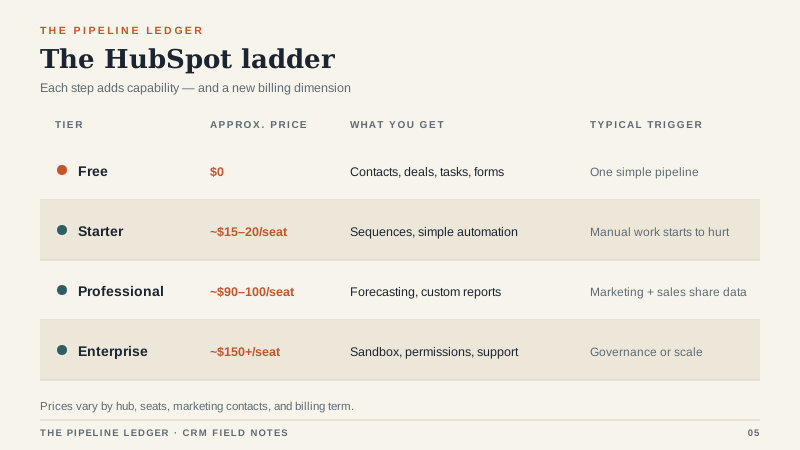
The pricing ladder
HubSpot prices by hub, by seat, and, for marketing products, by contact tier. That means the number on the pricing page is rarely the number on your invoice.
Starter tiers generally land around $15 to $20 per seat per month. You get more automation, simple sequences, and better reporting. For a five-to-fifteen-person sales team, this is often the sweet spot.
Professional tiers commonly run $90 to $100 per seat per month. This is where forecasting, custom reporting, deeper automation, and team permissions arrive. It is also where onboarding fees show up, often $1,500 to $6,000 depending on the hub and the scope.
Enterprise tiers start around $150 per seat per month and go up from there. You are buying governance, sandboxes, advanced permissions, and support. Most small businesses do not need this. Some buy it anyway because a single feature, usually sandbox or custom objects, lives only at the top.
The contact-tier trap
HubSpot’s marketing products charge by marketing contacts, not by every contact in your database. That distinction is generous on paper: you can store a large database and only pay for the people you actively market to. In practice, it creates two problems.
First, someone has to decide what counts as a marketing contact. If your team imports a purchased list, syncs a webinar attendee file, or turns on a lead-capture form, those contacts can push you into the next tier. The bill changes without anyone changing a plan.
Second, the tiers create an incentive to keep lists dirty. Teams avoid cleaning contacts because cleaning might change their billing. That is a bad reason to keep bad data.
If you are on a marketing hub, review marketing contacts monthly. If you are not running active campaigns to a segment, it probably should not be a marketing contact.
Where the bill actually comes from
Most HubSpot invoices are a stack of five things: seats, hub subscriptions, contact tiers, onboarding, and add-ons. The base seat price gets the attention. The platform fee and contact tier get the money.
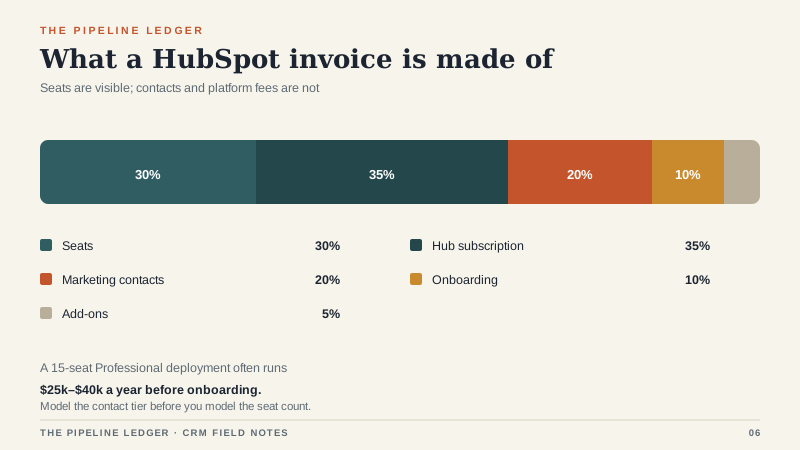
A 15-seat Sales Hub Professional deployment can easily land between $25,000 and $40,000 a year before onboarding, and a Marketing Hub Professional subscription can add another $10,000 to $40,000 depending on contact volume. Those are not unusual numbers for mid-market software. They are unusual numbers for a team that thought it was upgrading a free CRM.
Where HubSpot earns its money
HubSpot is at its best when marketing and sales need to share one record. A prospect fills out a form, the contact appears in the CRM, marketing sees the deal, sales sees the campaign, and nobody exports a CSV. That loop is genuinely hard to build from separate tools, and HubSpot does it better than most.
It is also unusually easy to adopt. The interface is clean, the defaults are sensible, and a new rep can be productive in an afternoon. That matters more than any feature list. A CRM nobody uses is a spreadsheet with a login screen.
For teams with an inbound content engine, a sales-assist motion, or a service desk that needs the same customer record, HubSpot’s bundle can replace three or four point tools. When it does, the price looks different.
Where it hurts
HubSpot is not the cheapest option at scale, and it is not the most customizable. If you need complex CPQ, deep ERP integration, or a data model that does not match HubSpot’s objects, you will spend a lot of money making the platform do something it did not intend.
Pure outbound teams often find HubSpot’s marketing gravity unnecessary. A lighter sales CRM can do the job for a third of the cost. Very small teams can also stay on free far longer than the sales process suggests, which is a feature, not a failure.
The other risk is fragmentation. Buy Sales Hub Starter, then Marketing Hub Pro, then a service subscription, and you end up with three bills, three owners, and an integration project between products that were supposed to be one platform.
A cheaper way to run it
Start with Sales Hub Starter and the free CRM. Skip Marketing Hub Professional until you have a content engine that will actually use it. Clean marketing contacts every month. Buy annual only after you have used the monthly plan for a full quarter. Ask for the onboarding fee to be waived or reduced; it often can be, especially at renewal or quarter end. And do not buy Enterprise for one feature. Price the add-on separately and see whether a lighter tool covers that need for less.
The agency I mentioned eventually cut its HubSpot bill by about 40 percent. They dropped Marketing Hub Professional, kept Sales Hub Professional, cleaned their contact database, and moved their newsletter to a cheaper email tool. HubSpot did not become less useful. It became more focused.
How to decide
Ask three questions. Do marketing and sales need to work the same record every day? Will you actually use the automation and reporting that come with Professional? Can you name the person who will own the platform after launch? Three yeses make HubSpot a strong default. Two yeses mean start smaller. One yes means you are probably buying a brand, not a fit.
HubSpot’s free tier is a good place to begin. Just decide up front what would make you climb the ladder, and put a number on it. The ladder is easier to climb than to descend. If free is still on the table, the break-even math is in the free CRM guide.
