A nine-person sales team I worked with built its monday CRM setup in an afternoon. Three boards, a handful of automations, a pipeline that matched the way the founder talked about deals. For a year, it was the best CRM the company had ever used. Then the team grew, the boards multiplied, and the founder asked me why nobody could answer a simple question: how much pipeline do we have for next quarter?
Nobody could answer because there were fourteen boards, four naming conventions, and three definitions of “qualified.” The software had done exactly what it was asked to do. It had let the team build anything. That is the promise and the problem.
What monday CRM is
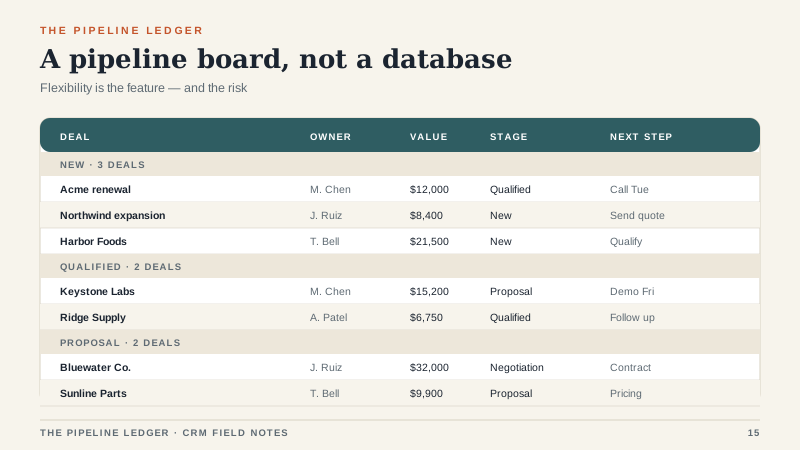
monday CRM is a CRM product built on monday.com’s board-based work operating system. Instead of a fixed data model with accounts, contacts, and opportunities wired together, you get boards, groups, columns, and automations that you assemble yourself. There are templates, and the CRM product adds sales-specific views and automations, but the underlying idea is flexibility.
That makes it closer to a customizable work database than to a traditional CRM. Sales teams that hate rigid pipelines tend to like it for the same reason operations teams like monday.com generally: it is visual, it is fast, and it does not force a process on you.
What it does well
Speed to a working system. A small team can have a pipeline board, an activity log, and an automation that creates a follow-up task in an afternoon. There is no implementation partner, no data model meeting, and no six-week discovery phase. For a team that has been living in spreadsheets, that speed is a real advantage.
Adoption. The interface is approachable. Reps can see their deals, drag them between stages, and update a next step without hunting through tabs. A system that people open is already ahead of a more powerful system that people avoid.
Flexibility. Need a board for partnerships, a board for renewals, and a board for a trade show? You can build them. The platform does not care what kind of work you are tracking.
Automations. Simple rules like “when stage changes to Proposal, create a task for the manager” or “when a deal has no activity for 14 days, notify the owner” are easy to set up. For SMB sales teams, that is usually enough.
Price. Compared with enterprise CRM platforms, monday CRM is affordable for small teams. The entry tiers are accessible, and you can start narrow.
Where it strains
Forecasting. This is the biggest gap for growing teams. A board can show you stages and values, but weighted forecasting, quota tracking, and rep-level attainment usually require workarounds. If your CFO wants a forecast you can defend, you will need a reporting layer or a different tool.
Reporting depth. monday has reporting and dashboards, but they are not as deep as a purpose-built CRM’s. Cross-board reporting, historical snapshots, and pipeline movement analysis can get awkward. The platform is improving, but it is still a work OS first.
Data consistency. Flexibility cuts both ways. If every team can invent its own stage names and fields, you end up with fourteen boards and no single source of truth. The software will not enforce discipline. You have to.
Board sprawl. The same flexibility that makes it easy to start makes it easy to fragment. One board becomes five, then fourteen, and the CRM becomes a collection of projects rather than a customer system.
Enterprise controls. Permissions, audit trails, and governance are better than they used to be, but teams with strict compliance requirements often outgrow the platform. If you need granular field-level security and a validated system, look carefully.
Cost at scale. Per-seat pricing adds up. A 50-person team on a mid-tier plan pays meaningfully more than a 10-person team, and the CRM features you need may push you to a higher tier.
Pricing reality
monday CRM is sold on per-seat tiers, usually Basic, Standard, and Pro, with Enterprise pricing by quote. Entry tiers commonly run around $12 to $17 per seat per month on annual billing, mid-tier plans around $28, and Enterprise higher. There is often a minimum seat count, usually three. Monthly billing costs more than annual.
The CRM product may also require a plan level that includes the features you need, so compare the CRM price, not the general monday.com price. Add-ons, extra automations, and storage can change the number. As always, confirm current pricing before you model a budget.
Who it fits
monday CRM fits small and mid-sized teams with a sales process that is visual, project-like, or still being figured out. Founder-led sales, agencies, professional services, event sales, and teams that need one place to see deals and delivery work often do well with it. If your reps hate rigid CRMs and your reporting needs are modest, it is a strong choice.
It also fits companies already using monday.com for project management. Keeping sales and delivery on one platform can reduce tool sprawl and make handoffs easier.
Who should look elsewhere
Complex enterprise sales with multi-level territories, strict forecasting, and deep CPQ needs a different platform. If that is you, run the evaluation process before you commit to a board-based tool. High-volume B2B sales with hundreds of deals per rep will hit reporting and data-governance limits. Regulated industries with audit requirements should check the controls carefully. And any team that needs a single, enforced data model should probably choose a traditional CRM.
How to keep it from becoming a mess
Pick one pipeline board and one intake process. Name stages the way the team talks, and write the definitions down. Limit custom columns to the ones a report or a handoff actually needs. Assign one admin, even if it is a part-time role. Review boards quarterly and archive anything that is not active. Define what “qualified” means once, and enforce it.
The team I mentioned eventually consolidated fourteen boards into two: one for active deals and one for renewals. They kept the automations that created tasks and reminders. They moved forecasting into a simple spreadsheet fed by a board export. It was not elegant, but it was honest. The CRM went back to doing what it was good at: helping people see the work.
The trade-off, stated plainly
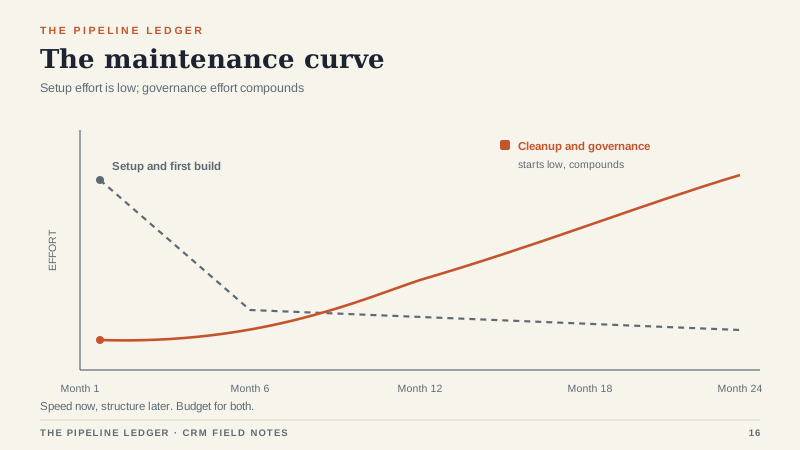
monday CRM is not a worse Salesforce. It is a different trade. You buy speed and flexibility with maintenance and governance. That trade is excellent for a small team that needs to move now. It becomes expensive for a larger team that needs one version of the truth.
If you choose it, choose it on purpose. Decide what you will enforce, what you will document, and who owns the cleanup. The software will let you build almost anything. The question is whether you can maintain it.
