The best CRM is the one your team is still using in month nine. Not the one that won the demo, not the one with the longest feature list, and not the one a review site ranked first because the affiliate payout was generous. The one that survives contact with a busy Tuesday.
That sounds obvious. It is also the thing most buyers forget between the shortlist and the signature. So instead of a ranking, here is the shortlist I use by team profile, with the trade-offs written down where you can see them. If you want the full evaluation method first, the decision process is the companion piece.
Four questions before the shortlist
Who updates the CRM? If the answer is “the sales rep,” the system has to be fast and mobile-friendly. If the answer is “an operations team,” you can tolerate more complexity. If the answer is “nobody,” buy something simple or do not buy at all.
What decision does it support? A forecast call, a pipeline review, a renewal conversation, a service handoff. Pick the one that matters most this quarter. The CRM should make that decision easier, not just store data about it.
What has to connect? Accounting, quoting, phone, marketing, support, inventory, or a data warehouse. Every connection is a project. Count them before you fall in love with an interface.
Who will administer it? A named person, with time in their week. If you do not have one, choose the simplest tool that meets the need, or budget for a part-time admin.
The shortlist by team profile
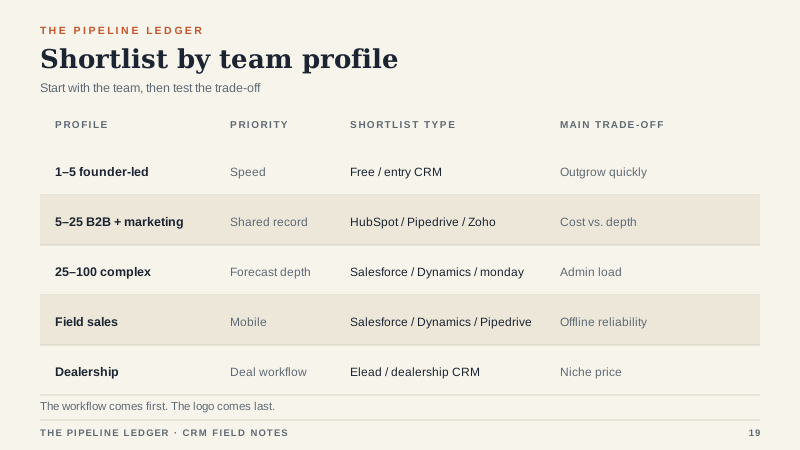
These are starting points, not verdicts. The right answer depends on the four questions above.
Founder-led, one to five users. Start with HubSpot’s free CRM, Zoho Bigin, or Pipedrive’s entry tier. You need contacts, deals, tasks, and email visibility. You do not need custom objects or a partner implementation. Keep it simple and revisit when you hire your second rep.
Five to twenty-five users, B2B with marketing. HubSpot is the default when marketing and sales share the same record. Pipedrive is the choice when the sales process is simple and the team hates clutter. Zoho is the value play if you can live with its interface and want a broad suite.
Twenty-five to one hundred users, complex sales. Salesforce and Microsoft Dynamics 365 Sales are the serious options. monday CRM can work for a project-like sales motion with modest reporting needs. At this size, the admin role and the implementation partner matter more than the logo.
Field sales and territories. Salesforce, Dynamics, and Pipedrive all handle the basics. The deciding factor is the mobile experience and how the team logs visits. Test the app on a real phone with bad signal, not on the sales engineer’s laptop.
Ecommerce and high-volume transactional sales. HubSpot is the common pick when marketing, sales, and service need one record. Check API limits and contact pricing before you commit. High volume can turn a reasonable per-seat price into a large bill.
Dealerships and vertical retail. A general CRM usually misses the deal workflow. Automotive retail needs desking, F&I, inventory, and service integration. That is a different product category; the dealership CRM guide covers the evaluation criteria.
The trade-offs, written down
HubSpot: ease for money. You get a clean interface, strong marketing integration, and fast adoption. You pay for it as you add hubs, seats, and contacts. It is an excellent middle-market choice and an expensive choice if you only need a pipeline.
Salesforce: depth for admin. You get a platform that can model almost any sales process. You pay in implementation, administration, and add-ons. It is the right answer for complex organizations with the staff to run it, and the wrong answer for a five-person team without an admin.
Pipedrive: simplicity for depth. You get a fast, visual pipeline that reps actually use. You give up some reporting depth and customization. For a small sales team with a straightforward process, that is a good trade.
Zoho: price for polish. You get a broad suite at a low price. You may give up interface refinement and some integration depth. It works well for cost-sensitive teams that can invest a little configuration time.
monday CRM: flexibility for governance. You get a board-based system you can shape in an afternoon. You pay in maintenance and data discipline. Great for small teams that need to move; harder for larger teams that need one version of the truth.
Dynamics 365: Microsoft for complexity. You get deep integration with Microsoft’s stack and strong enterprise capabilities. You pay in licensing complexity and implementation effort. It makes the most sense if you are already a Microsoft shop.
Elead: dealership workflow for a dealership price. You get desking, F&I, inventory, and service integration in one system. You pay a niche price and accept a niche product. For a dealership, that is often the point.
Why “best” lists mislead
Most best-of lists are built on feature checklists, demo polish, and affiliate economics. None of those predict whether your team will use the system. A vendor can have every feature and still lose to a simpler tool that a rep can update between calls.
There is also an enterprise bias. Reviewers often evaluate the top tier of each product, then recommend it to a small business that will never use half the capability. The result is a team paying for a platform and running a spreadsheet beside it.
Finally, the list is usually written for the reviewer’s sales motion. If the reviewer sells high-ticket B2B services, every CRM will be judged on pipeline stages and forecasting. If you sell a $40 product to 10,000 customers a year, your needs are different.
The scoring worksheet
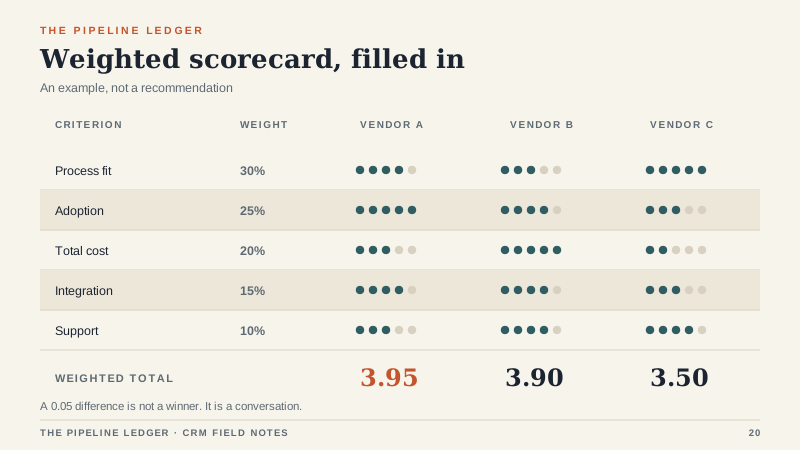
Before the demos, agree on five criteria and weights. Mine are process fit (30 percent), adoption (25 percent), total cost (20 percent), integration (15 percent), and support (10 percent). Score each vendor from one to five on each criterion, multiply by the weight, and add the totals.
The exact weights matter less than writing them down before the demo. A vendor that scores well on process fit but poorly on adoption is a warning, not a winner. A vendor that scores well on cost but poorly on integration is a future project.
The rollout that makes any CRM better
Pick one pipeline and one report. Give two reps a week to work real deals in the system while someone watches. Fix the first three points of friction. Roll out to the rest of the team when those two reps can run a full week without a parallel spreadsheet.
That process works with almost any of the tools above. It fails with almost any tool if you skip it. The software is not the variable that determines adoption. The first thirty days are.
The boring answer
Choose the system your team will use, at a total cost you can defend, with an admin you can name. Then spend your energy on the rollout instead of the shortlist. The best CRM is rarely the most exciting one. It is the one that is still there, still accurate, and still trusted when the quarter gets hard.
